How to: Use the Find and Replace QC Group Function
The QC Module allows users to mass remove a QC Group in areas of the system and replace them with a new QC Group. The Find and Replace QC Group function will require all QC documents to be processed or deleted for the QC Group that is being removed. The process will offer to delete the documents for you if it finds any open.
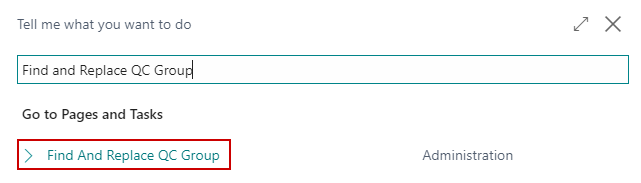
In the search box, enter Find and Replace QC Group and click on the related link.
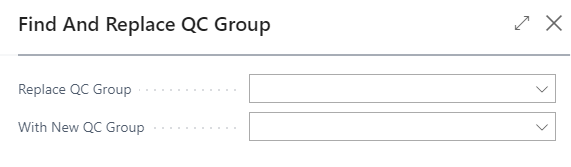
On the Find and Replace QC Group request page enter the following:
a. Replace QC Group: this will be the QC Group you want to remove.
b. With New QC Group: this will be the QC Group which will replace the deleted QC Group.
Next, you will select the areas of the system where you want to replace the QC Group . You have the following options:
a. Replace QC Group on Items
b. Replace QC Group on Item Categories
c. Replace QC Group on Item Tracking Codes
d. Replace QC Group on Routing Lines
e. Replace QC Group on Work Centers
f. Replace QC Group on Machine Centers
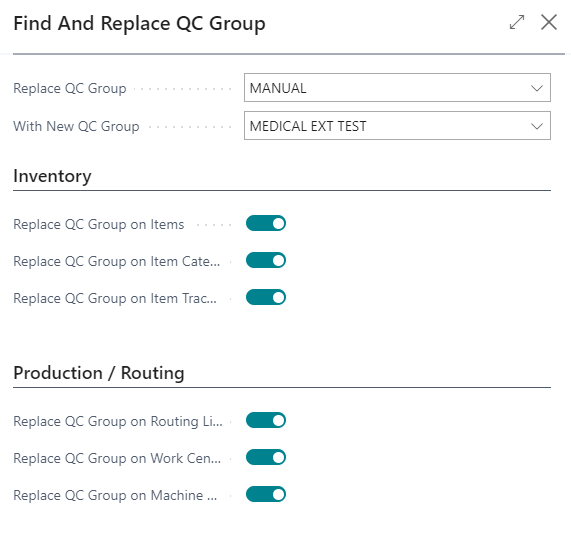
Once the areas of the system are selected click OK to remove the QC Group and replace it with the selected QC Group.